Common problems
Your website looks outdated. Here’s how to fix it.
“I’m a bit embarrassed to send people to our website. It looks like it was built ten years ago, and it’s painful on a phone.”
What I hear from business owners
Why it happens
Why websites date so quickly
Most small-business sites were built once and never touched again. Design trends move on, but the bigger problem is what you can’t see: layouts made for desktop screens, oversized images, and themes or plugins that stopped being updated years ago.
Visitors judge a business by its website in seconds. An old-looking site doesn’t just look dated; it quietly suggests the business might be too. And because older sites tend to load slowly on phones, Google is less keen to show them too.
What I do
How I fix it.
See a working preview before you pay.
- 01
Keep what works
Your content, your domain and any pages that already bring in traffic are kept and improved, not thrown away.
- 02
Redesign around your customers
A layout built for phones first, with clear calls to action and real photos of your work where you have them.
- 03
Hand-code it to load fast
No page builder, no plugin bloat. The finished site is quick on a phone and easy for Google to read.
- 04
Show you before you pay
You see a clickable preview of the new homepage in about 7 business days. If it isn’t right, you haven’t spent anything.
Real example
Tailored Fitness
Tailored Fitness, a Padbury gym, had me redesign their existing website. The new site is organised around their programs, with training video, a FAQ and a contact form.
Read the Tailored Fitness case study →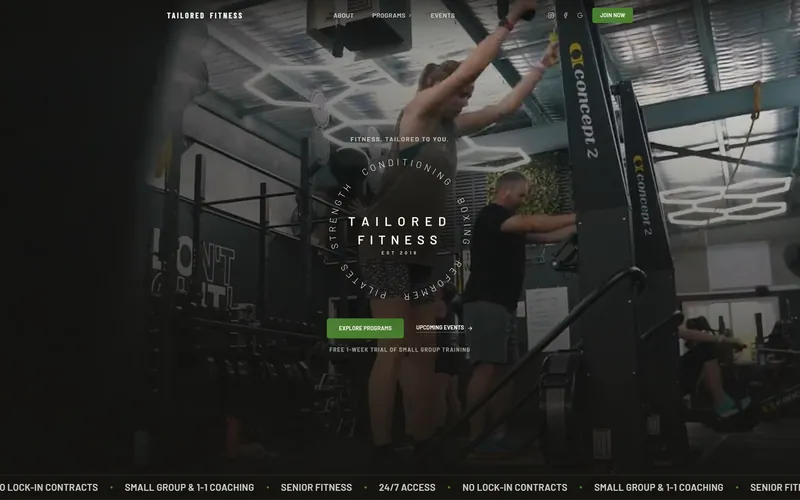
Price & timeline
What it costs, and how long.
- Price
- from $1,000 (up to 3 pages), extra pages $150 each
- Timeline
- Working preview in ~7 business days; launch within 7 business days of your content.
- Payment
- Nothing until you approve the working preview
A redesign is priced like a new build, because it is one. Larger sites are quoted upfront.
See it working before you pay.
See a working preview before you pay. Tell me about your business and I’ll build a real, clickable preview of your homepage. No payment until you approve it.